Networking Dashboard
Select the player prefab and the networking story reads itself: every sync concern as a row, with its authority flavor, whether it is installed, and — in play mode — whether it is actually doing anything. You never reverse-engineer a component stack to answer a networking question.
The stack as rows
The dashboard lives on NetworkPlayerController— the component every player prefab already carries. Its rows are the player's sync concerns: transform and animator sync always, plus one row per replicator whose feature lives on the object — stats, inventory, combat payloads. Each row states its flavor in a sentence (owner-authoritative, server-arbitrated, server-to-owner delivery) and whether the piece is installed.
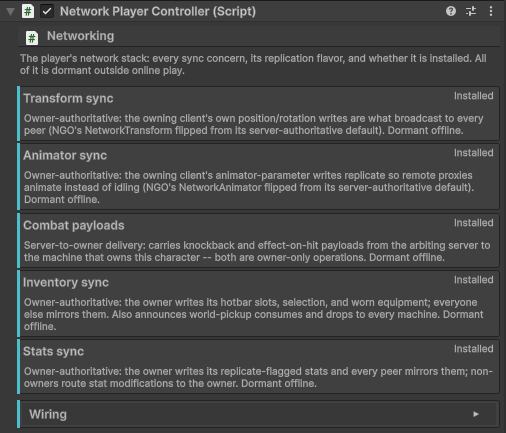
Scene-side concerns (rounds, maps, world state) stay off the player's list — a row only appears where its concern belongs. The plumbing itself is hidden from the Add Component search: the installer and this dashboard are the only two ways a replicator reaches an object, so a half-configured stack cannot be assembled by hand.
One-click repair
A missing piece shows an Add button on its row. The add lands on the prefab asset, never on the scene instance you happen to be inspecting — an instance-only override would be invisible to the next Install, and the split-brain stack it creates is exactly the failure class this dashboard exists to kill. The dashboard is add-only: it never removes.
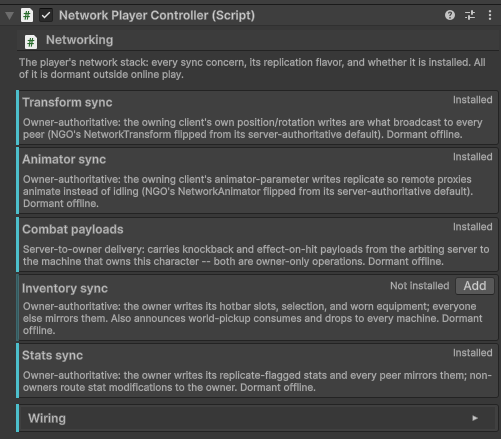
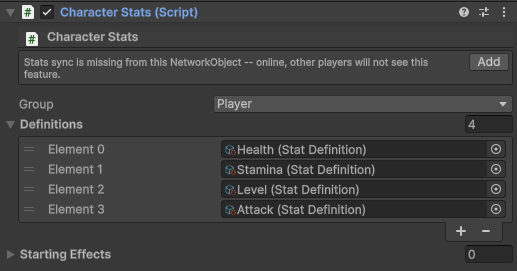
Feature inspectors watch their own backs, too: if CharacterStats, CharacterInventory or the damage sink sits on a NetworkObject without its paired replicator, that inspector shows a one-line warning with the same Add button — visible where you are already looking.
Play mode: live, dormant, and who is driving
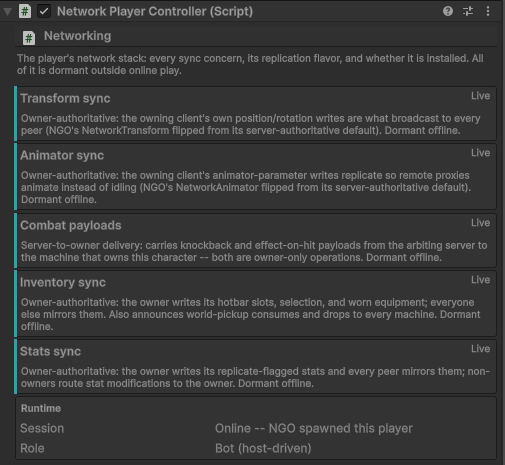
While the game runs, rows switch to what the layer is actually doing: Live once the online session has spawned the component, Dormantin every offline mode — the same components, deliberately inert. A readout underneath names the session state and the instance's role: local owner, remote player, or bot.
Why the branches cannot drift
Behind the dashboard sits the same guarantee that keeps installs honest: the fresh-build and retrofit paths of the installer are diffed against each other by an automated parity test, so a component added to one branch and forgotten in the other fails the build instead of silently never reaching your project.