Character
One player prefab powers single-player, split-screen and online. This guide walks its component stack, the movement modes, how to drive it from code, and how it comes back after falling off your level.
Overview
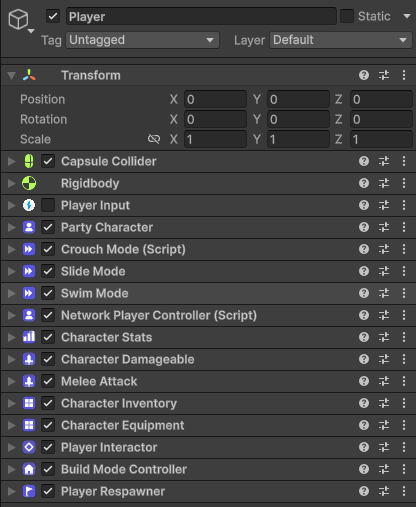
The character is deliberately one prefab. Instead of maintaining an offline player, a couch-co-op player and a networked player, every mode-specific component on the prefab wakes up only when its mode is active — offline, the networking components stay dormant; online, remote copies keep their input and camera off. You tune one object, and it behaves correctly everywhere. A single level that wants its own attack, stats or components does not have to touch this shared prefab at all — see One prefab, or one per level on the Game Modes page.
The component stack
Selecting the player prefab opens a compact module map. Each row summarizes one concern, reports whether its expected components are present and expands to edit that module inline. Movement owns its movement-mode components and MovementConfigtuning in one place; Core shows the shared references without duplicating those controls. Sensors & Gizmos stays folded until needed, and replicators remain hidden behind their owning gameplay modules.
| Field | Type | What it does |
|---|---|---|
Rigidbody + CapsuleCollider | Unity | The character is physics-driven — movement forces act on the body, animation stays visual-only. |
PlayerInput | Unity Input System | Device pairing and input actions. Ships disabled on the prefab — see the callout below. |
PartyCharacter | Movement | The movement brain: owns the active movement mode, ground/water/wall sensing and the public input API. |
NetworkObject + ClientNetworkTransform + OwnerNetworkAnimator | Netcode | Owner-authoritative position and animation replication. Dormant outside online sessions. |
NetworkPlayerController | Netcode | Decides who controls this instance: enables input, camera and movement for the owner, keeps remote proxies passive. |
CharacterStats + StatReplicator | Stats | Health, stamina and level from stat definition assets; the replicator mirrors values to other machines. |
CharacterInventory + CharacterEquipment + InventoryReplicator | Inventory | Carried stacks, worn gear with stat bonuses, and their network mirror. |
PlayerInteractor | Scripting | Finds nearby interactables and drives their prompts — press, hold or multi-press. |
PlayerRespawner | Rounds | Death and fall recovery with checkpoints — detailed below. |
Movement modes
Movement is a set of self-contained modes behind one interface — the active mode owns the physics until it hands over. All tuning lives in a single MovementConfig asset, so balancing a feel change is one file, not a component hunt.
On the ground
Walk & SprintCrouchSlideIn the water
SwimSprinting drains stamina and resting refills it (the hook into Stats & Effects), and every mode maps to an animator contract your own rig can implement.
Driving the character from code
Player devices reach the character through Unity's input callbacks, but those callbacks just forward to public methods — and your code can call the same methods. That keeps the low-code promise intact: the toolkit's own UI, instructions and future AI all steer characters through this one front door.
using Curitor.PartyCoreKit.Character;
using UnityEngine;

// Anything can drive a character through the same public API the
// input callbacks use -- UI buttons, cutscenes, AI, tutorials.
public class AutoRunner : MonoBehaviour
{
    [SerializeField] private PartyCharacter character;

    private void Update()
    {
        character.SetMoveInput(Vector2.up);  // clamped to length 1
        character.SetSprint(true);           // drains stamina while moving

        if (character.IsGrounded)
            character.RequestJump();         // consumed on the next physics tick
    }
}
The full surface includes SetMoveInput, RequestJump, SetJumpHeld, SetSprint and SetCrouch, plus read-only state like IsGrounded, InWater and IsSprinting for your own conditions.
Respawning: PlayerRespawner
The last component on the stack answers an unglamorous but essential question: what happens when a player dies or falls off the map? The respawner waits a beat, returns the character to its last checkpoint (or a spawn point if none is set), and optionally refills its stats.
| Field | Type | Default | What it does |
|---|---|---|---|
Respawn Delay Seconds | float | 1.5 | Pause between dying (or falling) and reappearing at the checkpoint. |
Kill Below Y | float | -15 | Falling below this world height counts as a fail and triggers a respawn — the safety net under every level. |
Restore Stats | bool | on | Refill vitals on respawn, so players return ready instead of crawling back on low health. |
Checkpoints usually come from the stock SetCheckpointInstructioncomposed onto a trigger zone — no code needed. From code, it's two methods: SetCheckpoint(position, rotation) and RequestRespawn().
using Curitor.PartyCoreKit.Rounds;
using UnityEngine;

// Set a checkpoint from your own code (the stock
// SetCheckpointInstruction does exactly this).
public class CheckpointOnEnter : MonoBehaviour
{
    private void OnTriggerEnter(Collider other)
    {
        var respawner = other.GetComponentInParent<PlayerRespawner>();
        if (respawner == null || !respawner.IsLocallyControlled) return;

        respawner.SetCheckpoint(transform.position, transform.rotation);
    }
}