Feedback
A hit needs to be felt, not just resolved. A Feedback Definition bundles a particle, a camera shake, a beat of hit-stop and an optional sound into one asset — bind it to a character's hurt, death, knockback and landed hits with nothing but dragging assets into four slots, or fire it from a rule with the Play Feedback node.
One asset, four effects
FeedbackDefinition is a plain ScriptableObject recipe — every field on it is optional, and a definition with nothing set is a legal, silent no-op. FeedbackPlayer.Play is the one entry point that plays one: nothing needs to be wired up in the scene first, and it works from anywhere — a component, a rule, an editor tool.
| Field | Type | Default | What it does |
|---|---|---|---|
particlePrefab | GameObject | — | Optional. Must carry a ParticleSystem. Spawned at the position, +Y aligned to the surface normal, and returned to a pool when it finishes. |
attachToTarget | bool | false | Whether the spawned particle follows the target instead of staying put at the world position it was spawned at. |
cameraShake | float | 0 | Trauma added to every local camera, 0–1. 0 = no shake. |
shakeRadius | float | 0 | Falloff radius in metres. 0 means only the affected player's own camera shakes, at full strength — nobody else's camera reacts at all. |
shakeDuration | float | 0.3 | Seconds the trauma this adds takes to decay back to zero. |
hitStopSeconds | float | 0 | Real-time dip of Time.timeScale, for this many seconds. 0 = none. Never stacks — an overlapping play extends the one active dip instead of compounding it. |
sound | AudioClip | — | Optional. Played at the position through a pooled AudioSource. The kit ships no audio files — this slot is for your own clip. |
cooldownSeconds | float | 0 | Minimum seconds between plays of THIS definition. A play requested inside the cooldown is dropped silently, by design. |
The four stock definitions
CharacterFeedbackwires a character's hurt, death, knockback and landed-hit moments to four FeedbackDefinition slots — no code beyond dragging assets in. The stock character ships four ready-made definitions, Feedback_Hurt, Feedback_Death, Feedback_Knockback and Feedback_HitLanded, already assigned to those slots with a particle, a shake amount and a hit-stop that read as a felt hit out of the box — swap the assets or retune the numbers, the slots themselves need no further wiring. The same four assets are reused wherever else the Setup window wires feedback, not re-authored per prefab:
| Field | Type | What it does |
|---|---|---|
Stock player | CharacterFeedback | All four — Feedback_Hurt, Feedback_Death, Feedback_Knockback, Feedback_HitLanded — into the four slots above. |
Target Dummy | DamageableFeedback | Feedback_Hurt and Feedback_Death only, into onHurt/onDeath — a plain prop has no knockback or landed-hit slot to fill. See "Props: DamageableFeedback" below. |
| Field | Type | What it does |
|---|---|---|
onHurt | FeedbackDefinition | Played when this character's health decreases, for any reason (combat, a hazard, a draining effect). |
onDeath | FeedbackDefinition | Played once on the alive-to-dead transition. Healing a dead character back up does not re-fire this. |
onKnockback | FeedbackDefinition | Played when this character is knocked back. Fires only on the machine that owns this character. |
onHitLanded | FeedbackDefinition | Played on the INSTIGATOR side (this character) when it lands an accepted hit on someone else — at the target's position. |
effectAnchor | Transform | Where onHurt/onDeath/onKnockback play, and what the particle attaches to if the definition asks for that. Empty defaults to this character's own collider centre. |
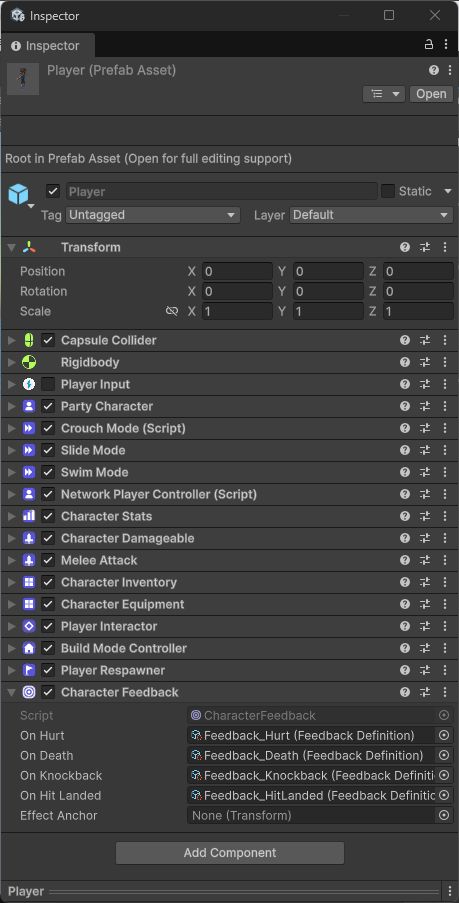
Each slot derives from data the character already has, and each one arrives a different way — worth knowing before you wonder why one behaves differently from the others:
| Field | Type | What it does |
|---|---|---|
onHurt / onDeath | derivation | Watch the character's own health stat (StatInstance.OnChanged / CharacterStats.OnAliveChanged) — the same replicated value on every peer, so both fire identically on every machine with no wire traffic of their own. |
onKnockback | derivation | Watches PartyCharacter.OnKnockedBack, an owner-only event by contract — fires only on the machine that owns this character, never for a remote peer's knockback. |
onHitLanded | derivation | Watches CombatArbiter.OnClaimAccepted, filtered to claims this character instigated — fires only on the machine that resolved the claim (the arbiter's — the server online, everywhere offline). |
Props: DamageableFeedback
DamageableFeedback is the DamageableObject twin of CharacterFeedback, for props that keep their own health instead of a full CharacterStats stack — the shipped Target Dummy, a breakable crate, anything built on DamageableObject. It cannot be the same component: CharacterFeedback requires CharacterStats and reads its Health stat, and a prop deliberately has neither.
| Field | Type | What it does |
|---|---|---|
onHurt | FeedbackDefinition | Played whenever this object takes damage — every hit, not just the killing one. |
onDeath | FeedbackDefinition | Played once when this object dies. |
effectAnchor | Transform | Where onHurt/onDeath play, and what the particle attaches to if the definition asks for that. Empty defaults to this object's own transform. |
Use CharacterFeedback for anything with a stats stack — a player, an AI combatant; use DamageableFeedbackfor a plain prop with no stats. On the shipped Target Dummy the anchor sits at the collider's bottom rather than its centre, so the death dust reads as coming from the ground the goblin visual collapses onto rather than from empty air at chest height.
Playing it from code
FeedbackPlayer.Play is the whole surface — a static call, no component to add, no host to create by hand (it is created lazily, the first time anything plays):
FeedbackPlayer.Play(definition, hitPoint, hitNormal,
    attachTo: target.transform, affectedPlayer: attacker);
affectedPlayer is whose camera(s) get the FULL shake trauma regardless of shakeRadius — every other local camera falls off by distance instead. Pass nullwhen nobody in particular is "the" affected player (a shared hazard, a level event). An overload without a normal aligns the particle's +Y to world up instead.
Playing it without code
Play Feedbackis the low-code entry point for authored moments that do not come from a character's own hurt/death/knockback/hit-landed bindings — a trap springing, a pickup celebrating, a destructible prop's last moment.
| Field | Type | What it does |
|---|---|---|
Feedback | FeedbackDefinition | What to play. Left empty, this instruction does nothing — feedback slots are optional everywhere in this module. |
Target | Object (resolved) | Where to play it. Defaults to the subject — the object that fired this rule. |
A goal that shakes the scorer
Create a FeedbackDefinition
Right-click in the Project window and choose Create → Party Core Kit → Feedback → Feedback Definition.Assign FX_Burst
DragFX_BurstfromFeedback/Stockinto theparticlePrefabfield.Set camera shake parameters
SetcameraShaketo 0.8,shakeRadiusto 0 (only the scorer's own camera), andshakeDurationto 0.5.Add a Trigger behaviour to the goal volume
Select the goal volume in the scene, add a Trigger behaviour from the Behaviours panel, set it to On Enter.Add a Play Feedback instruction
In the Trigger behaviour, add a Play Feedback instruction with the definition you created, and leaveTargetset to Subject.Play and feel it
Press Play — the player who enters the goal gets the burst particle and the full camera shake, everyone else nothing.
Camera shake
CameraShake sits on the camera rig and adds a decaying trauma offset on top of whatever CameraRig computed for the frame, through CameraRig.OnAfterPositioned— a seam that fires synchronously at the end of the rig's own LateUpdate, so the offset can never accumulate: the rig recomputes its base transform from scratch every frame, and an offset added here is already gone before the rig writes again.
| Field | Type | Default | What it does |
|---|---|---|---|
maxOffset | float | 0.35 | Position wobble at full trauma (trauma = 1), in metres. |
maxRoll | float | 4 | Roll wobble at full trauma (trauma = 1), in degrees. |
noiseFrequency | float | 18 | Perlin noise cycles per second — higher reads as a faster shudder. |
The shape follows Squirrel Eiserloh's trauma model: trauma lives in [0,1] and shake magnitude is trauma², so a small amount barely registers and it ramps up fast near 1. Full amount for the affected player: whoever a play names as affectedPlayer gets the complete cameraShake value on their own camera regardless of distance or shakeRadius; every other local camera falls off linearly with distance and gets nothing past the radius (or when it is 0 — the documented meaning of "only the affected player's own camera shakes"). Split-screen has several cameras active at once, and each one judges its own falloff/affected-player check independently, so a knockback that hits player one shakes player one hard and player two only a little, in the same frame. Decay uses whichever active shakeDurationis longest, so an overlapping shorter shake can never cut a longer one's decay short.
Making your own
Create the asset
Right-click in the Project window and choose Create → Party Core Kit → Feedback → Feedback Definition.Set only what you need
Every field starts inert — a fresh definition with nothing set is a legal no-op. Add a particle, a shake amount, a hit-stop, a sound, in any combination.Assign it
Drag it into one ofCharacterFeedback's four slots, a Play Feedback instruction'sFeedbackfield, or pass it directly toFeedbackPlayer.Playfrom your own code.
How big the shake gets is set in two places: cameraShake on the definition is the trauma it adds (0–1), and CameraShake on the player's camera rig caps the amplitude with maxOffset (metres), maxRoll (degrees) and its frequency. If cameraShake = 1 still feels small, raise the ceiling on the rig, not the definition.
The one intentional silence
Every other empty or zero field in this module is ordinary authoring — a definition with no particle just plays no particle. cooldownSeconds is the one place a play is actively dropped: a play requested inside a definition's own cooldown window does nothing at all, no log, no event. It exists so a rapid-fire source (a tick-damage hazard, a fast weapon) cannot spam the same particle and shake into an unreadable blur — set it to 0 (the default) for a definition you want to play every single time.